Your scope, imported from Excel
The library ships with nothing marked as accredited, because accreditation belongs to your lab. Your scope is imported from an Excel sheet with columns for sample type, parameter, method reference, whether you test it, NABL, NABL serial number, LOD and LOQ.
Every row is previewed before anything is saved, and one tick switches off whatever the sheet doesn't list. Where your scope words a method differently from the library, keep it as “Same method, written our way”, and the report shows the citation exactly as in your scope.
Library updates never change your scope: new parameters arrive switched off.
ULR numbers with F and P
Once your NABL certificate number is entered, reports with accredited results carry the NABL symbol and a ULR. The ULR is your certificate number, the two-digit year, a 0 and an eight-digit running number, ending in F when every result on the report is accredited or P when only some are. A demonstration lab's ULR looks like TC000026000000005F. The running number restarts each calendar year.
A lab without accreditation leaves the NABL number empty and gets the same reports without the symbol or ULR.
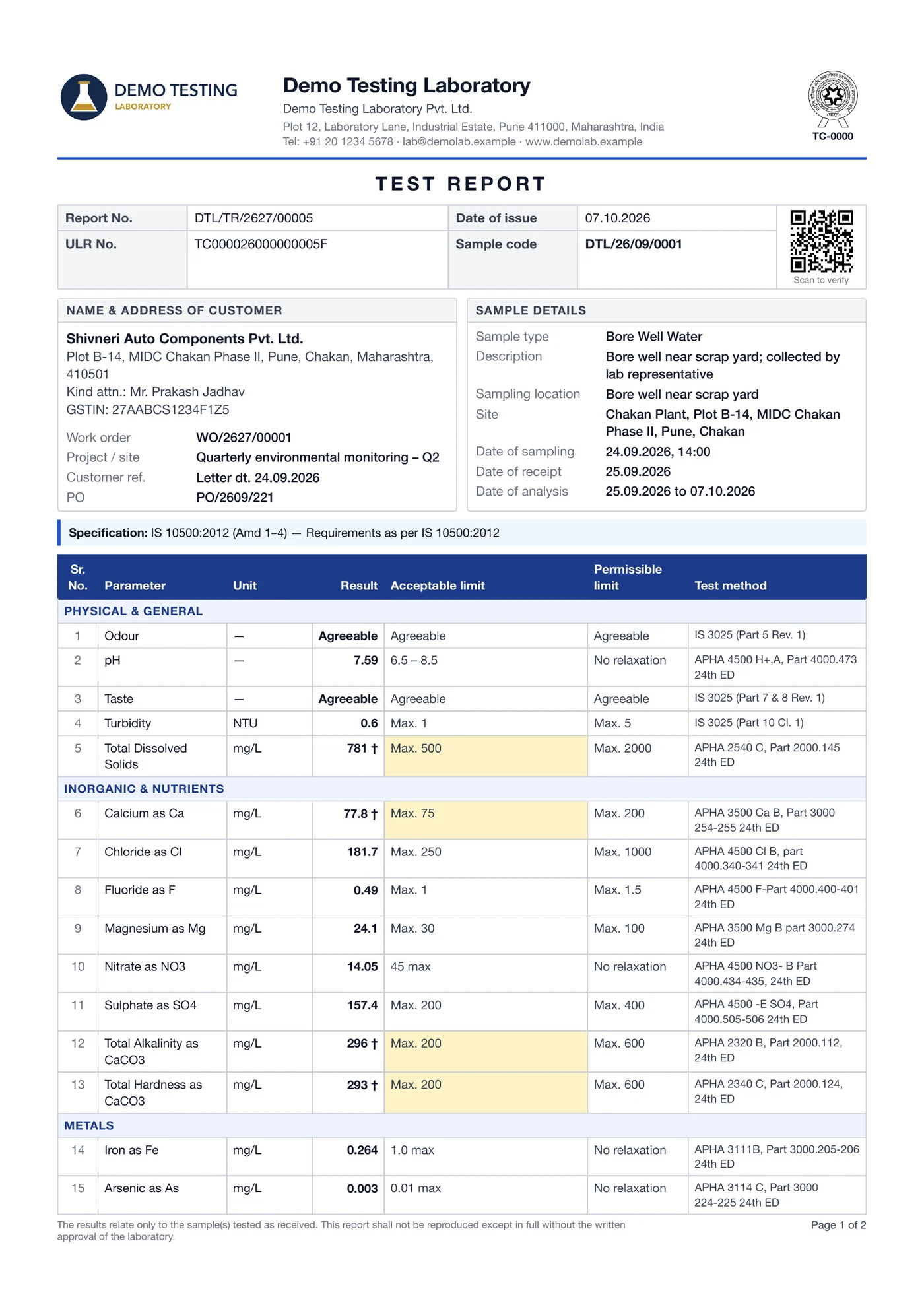
Accredited and other parameters
When a report has both, you choose how they are split. By default the accredited parameters go in Part 1 with the NABL symbol and ULR, and the others follow on a separate page as Part 2, without either. Each part carries its own signatures. Alternatively, the other parameters go on a separate report with its own number, and a line on the report points to the other one.
Blind analysis
Blind analysis is on by default. Analysts work on the lab's sample code: they see the sample type, its details and their own tests, never the customer, project, work orders or reports, and the server refuses those pages to them. Front office, Technical Manager, Authorised Signatory and Admin see everything.
Holding-time ‡ and short-sample ◊ marks
Two common deviations are recorded as they happen and printed the way you decide:
- A test started after its holding time prints ‡. By default it stays in the NABL part with the mark; you can move it outside the NABL part, or print it with no mark.
- A test done on less sample than its method needs, with the customer's consent recorded at inward, prints ◊. By default it goes outside the NABL part; you can keep it in the NABL part with the mark.
The approve dialog lists late starts and short samples, so the reviewer sees them before signing.
Two-level approval, run history and the audit log
Approval has two levels by default: the Technical Manager reviews each sample, then the Authorised Signatory authorises it, and the sample shows which step it is waiting for. A lab can switch to one level. The owner can give both approvals in one click, or you can require two people every time. Signatories can be set per Section, so each signs only the parts of a report that hold their Section's results.
Tests are sent back with a reason, as Correct an entry (a typing or copying mistake) or Re-analyse (a new analysis on another portion of the sample). Every earlier run stays in the run history with its readings, analyst, date and the reviewer's note, and the report prints the current run. Once the first approval is given, results are locked.
The audit log, open to the Admin, records changes such as an edited result with the time, the user, and the old and new values. Signatures are images each signatory uploads, printed with name, designation and date; they are not digital signatures. Each issued PDF is stored with a SHA-256 fingerprint, and once your verification page is online, a QR lets customers check that their copy is genuine and unchanged.
Amendments and withdrawals
An amended report keeps its number and states its revision, the report it supersedes and, by default, the reason, in line with ISO/IEC 17025 clause 7.8.8. It keeps its ULR. A withdrawn report is marked WITHDRAWN on every copy opened afterwards, while the stored PDF stays as issued, and a report issued in its place gets a new number and says which report it replaces.
Report and sample numbers follow your own pattern and can carry on from your previous software's last number.
What it doesn't do
Tanush LIMS is for testing labs: water and wastewater, food, air, stack and noise, soil, fuels, water treatment chemicals and construction materials. It has no QMS modules (document control, training, proficiency testing, NCRs or internal audits), it doesn't cover calibration labs' certificates and measurement uncertainty, and it is not built for pathology labs.
Further reading
- Common NABL non-conformities and how to avoid themCommon NABL non-conformities in testing labs, clause by clause: records, traceability, validation, uncertainty, holding times, reports and data control.
- How to get NABL accreditation: process, documents and feesHow to get NABL accreditation for a testing lab: NABL 100B process steps, NABL 151 documents, NABL 100A fee heads, timelines and four-year validity.
- ISO/IEC 17025:2017 requirements checklist for Indian labsISO/IEC 17025:2017 requirements checklist, clause 4 to 8 in plain English, with the documents and records a NABL assessor asks to see in an Indian lab.
- Instrument calibration in a testing lab: NABL rules and recordsCalibration of instruments in a laboratory: NABL traceability rules, setting calibration frequency, intermediate checks, labels and an equipment register.
- LIMS vs Excel: the hidden cost of registers in a testing labWhat a testing lab loses on paper registers and Excel: retyped readings, calculation errors, missed holding times, wrong limits, rework and lost data.
- NABL test report format: ULR, NABL symbol and contentsNABL test report format explained: ISO 17025 clause 7.8 contents, the current ULR number format, NABL symbol rules, conformity statements and amendments.